It was a tough job for me to configure a connectivity between Exchange 2010 and SAP system as I am a student in Exchange 2010

.
The requirement was to receive mails in SAP but with out publishing SAP domain. SAP team was not ready to do any configuration change and the request was from high level of the Organization. SAP team just want to receive mails which sent to a particular mail address [User] that means they wanted us to receive mails and forward that to a SAP server to a particular port 250xx. The funniest thing is I was not aware that we can change destination port from settings of a ‘send connector’

. Let us check how I did it.
Note;- this method which is mentioned in this article can be used for any destination system where you want forward mail to a particular port.
For getting this happen you have to have some pre-requisites, they are,
1. One user mailbox with proper mail address.
-This is for receive mails. Set forwarder from the properties to the mail-enabled contact. [Pre-requisites 2]
2. One mail enabled contact
-This can be used to forward mails to SAP SMTP address.
Create Send Connector
1. Go the EMC from Exchange 2010 server.
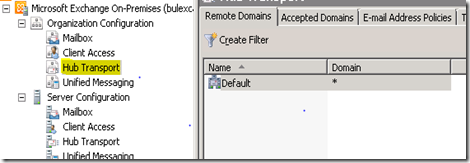
2. Brows through and locate ‘Hub Transport’ under ‘Organization Configuration’
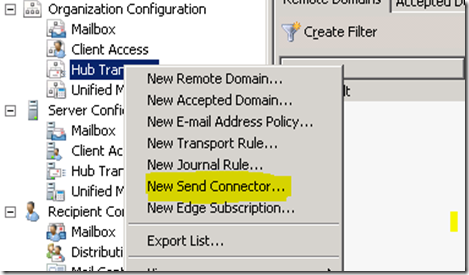
3. Right click on ‘New Send Connector…’
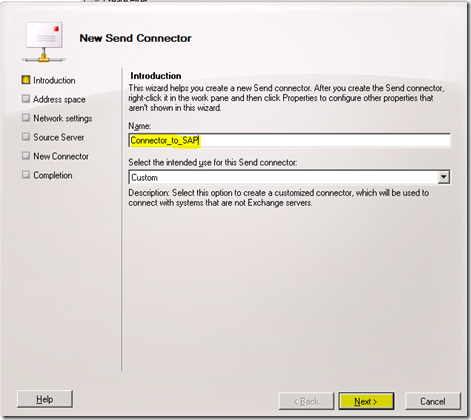
4. Give proper name and click on ‘Next’
note that its recommended to use ‘_’ in the name when you use multiple words in name that will help you when you use EPS
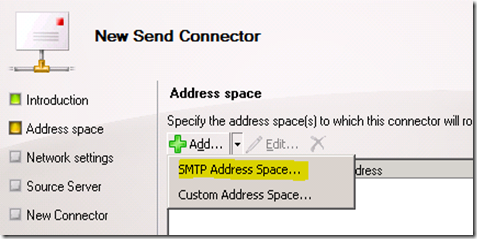
5. From next screen, go to Add dropdown and select ‘SMTP Address Space..’
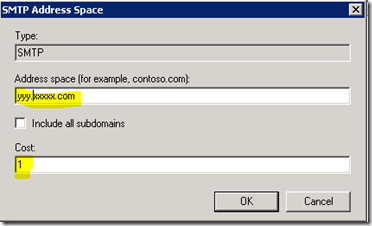
6. Enter the destination domain/SAP and click on OK.
Note;- Choose proper cost according to your needs, its recommended to use cost 1 if you don’t have more than one connector to SAP.
7. Review the settings that you have just made and click on
Next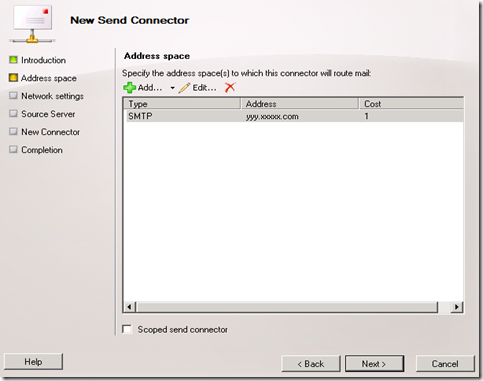
8. From next screen select ‘Route Mail through the following host:’ and click on Add.
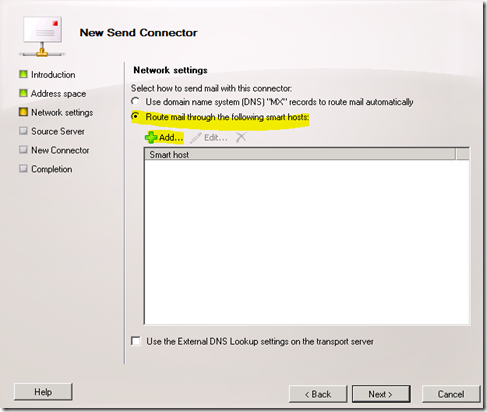
Enter the destination IP address and click on
OK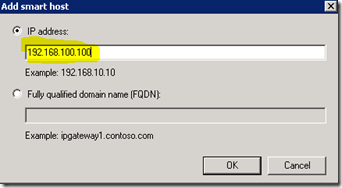
9. Review the settings and click on
Next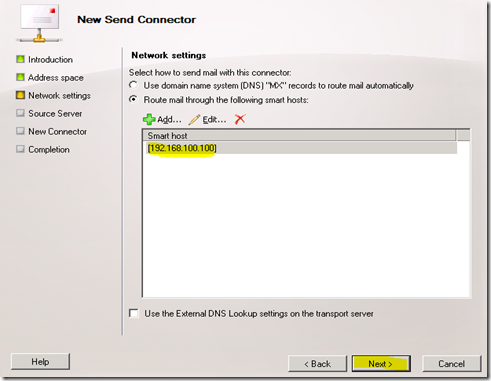
10. Leave it as default and click on
Next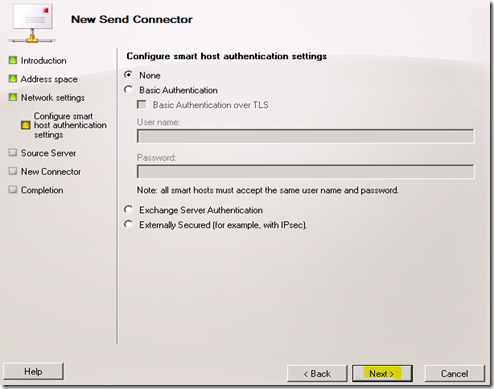
11. By using ‘
Add..’ button add the Hub Transport server/Edge Transport server and click on
Next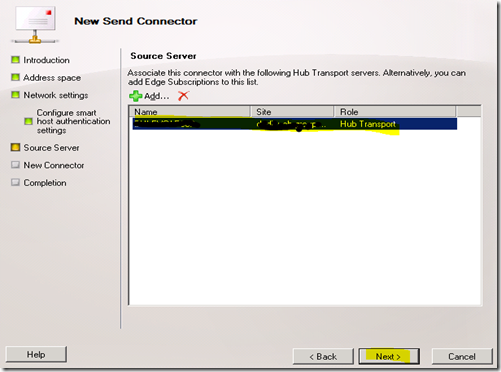
12. Review the settings and click on
New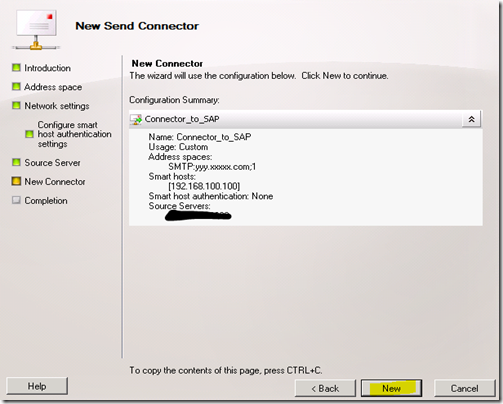
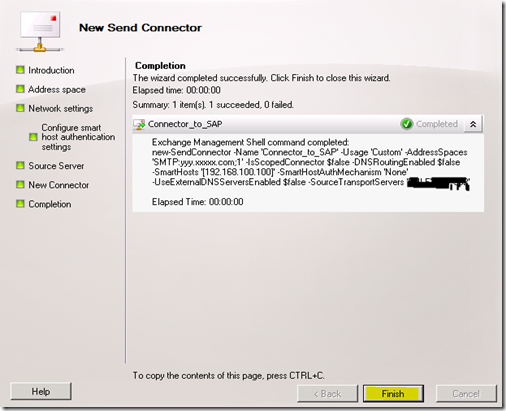
13. Now you are done with creating a send connector. Click on
Finish to complete.
 Configure send Connector with proper destination SMTP port.
1. Go to EMS from Exchange server 2010.
2. From Shell type below command and press enter.
Note choose the
Get-SendConnector -identity Connector_to_SAP |Set-SendConnector -port 2500 
3. Use the below command and make sure that SMTP port address is updated,
Get-SendConnector -identity Connector_to_SAP |fl
Send a test mail and track it, trust me you will be happy to read the track log
Note;- If you are confused somewhere in this article then I request you to write the comment, I will be happy to assist you.


![clip_image001[4]](https://blogger.googleusercontent.com/img/b/R29vZ2xl/AVvXsEjsHAr_Ol4gU69MiwyVmSROqtZXDzk6Aw8vHAU_0LUOXEF_G3xCVBFkk9ztAtHiNh5IUSbscIX6iAUFVwe31Iurm2OCVdlyLpqmWcv0heNN3DA0xs9ScpQH1NeYLAqphkDv8QnMobtF9NzA/s1600-h/clip_image001%25255B4%25255D%25255B3%25255D.png "clip_image001[4]")
![clip_image002[4]](https://blogger.googleusercontent.com/img/b/R29vZ2xl/AVvXsEiqP5yCYceDN3FG_qcdEcJOJZ6xNefOEKMHKeMwCsi491u9SZ3nTsNcF0-HZXnPkvW3BekLfC2Tr4-h_ps5W7QvLJUETydAAWzJ2ikKwoI1ki7powjs_WhAqvmRX5IZ9CccwRSiLiW9ZBHD/s1600-h/clip_image002%25255B4%25255D%25255B3%25255D.png "clip_image002[4]")
![clip_image004[6]](https://blogger.googleusercontent.com/img/b/R29vZ2xl/AVvXsEj7zwaZZ6Q0PnkvSiM0taAvS5OYnQnjadR05zJbCxkPpE6-WpIH8_IJqfLnTdYMO0BFwYQIuxhSfRioKvO47QHQZzpONAYTLdxM2YrOOKBxjX6w14pwW4Y2hQohtgUJ-ifHZnEE-KQZ2tMQ/s1600-h/clip_image004%25255B6%25255D%25255B5%25255D.jpg "clip_image004[6]")
![clip_image006[6]](https://blogger.googleusercontent.com/img/b/R29vZ2xl/AVvXsEjSV0CZZz81LaXlKmYKq-Eo4CzOTJIW6AlCPG5kxVC8RBQVpcO_xsi7EWLL4HENMR0EG93itRINePRgLnq8qRzEdrS6gZqwjKRY2q_BES1gkpJ7pdGH8RvQpFg-frDCMionhmjWAZP8URyn/s1600-h/clip_image006%25255B6%25255D%25255B3%25255D.jpg "clip_image006[6]")
![clip_image007[4]](https://blogger.googleusercontent.com/img/b/R29vZ2xl/AVvXsEiVBAzuWdZRIMMFOs-RyYFSZtgxTY71KdZXcG_d5Ei90BMki5VgvQblaaPEYc68jkXEVsqJ9_91ZlH9gzQeDs-NlSF1CmAnTXWSW7XpcNrVKHgiIfwCwp99jpLRMcz6Cta00aFvOWlQzpuW/s1600-h/clip_image007%25255B4%25255D%25255B4%25255D.png "clip_image007[4]")
![clip_image008[4]](https://blogger.googleusercontent.com/img/b/R29vZ2xl/AVvXsEgxn0RDntoRh2pf2NXSLPL-bKCvW1kt-wPJsMeHRGOPCFAJ-o5bKf3vB4YXcGtvKd_WzM4oZqRoeLTZa1QUKLBcxqMnhl-rZV87CRHsmoAy_6-3EzyfJ36X3Xw2R8j14PAK8V4OK-G4GXH3/s1600-h/clip_image008%25255B4%25255D%25255B3%25255D.png "clip_image008[4]")
![clip_image009[4]](https://blogger.googleusercontent.com/img/b/R29vZ2xl/AVvXsEhl1r0m2i3golOwWil-lwkUaBIjvztOUCm1eDZ5aTXy_89dDtXgBxODuyy5dfs1XndBo80SxZTi3GidGR8nHb2xTGxx45Jv2b9ekrDOE74cclpbEbbPp-101Er_ThyLkYIFWSYKv2mHDo0R/s1600-h/clip_image009%25255B4%25255D%25255B3%25255D.png "clip_image009[4]")
![clip_image011[4]](https://blogger.googleusercontent.com/img/b/R29vZ2xl/AVvXsEi_87BV3zFjccVN4CCjws6wUUskUdJa8gOj72WdByC6yrRoK7V1bxufjLMrRFdiP_6MOr3bOUHqq4zZ4vmhbmULfMnl_aUGyOSjGXhctaxDwaw67uISOTI9TErg-K3t667nhRrpLP8G8SRj/s1600-h/clip_image011%25255B4%25255D%25255B4%25255D.jpg "clip_image011[4]")
![clip_image012[4]](https://blogger.googleusercontent.com/img/b/R29vZ2xl/AVvXsEg2vI2iLR1NCE2St7zron0MEaf7D2cM2QBSoZ9iaoY0IFy9piMulLAw_d_weGjMIgQnUCNnaKo0sQHIe_5zEvbXUGbwOYeKGyRTOChWObWnzu1Mi0AqmrwhJnWUh9OKIuCk3-hoTvQOE5j4/s1600-h/clip_image012%25255B4%25255D%25255B4%25255D.png "clip_image012[4]")
![clip_image014[4]](https://blogger.googleusercontent.com/img/b/R29vZ2xl/AVvXsEhScf-QcKsy53SNaa6S7_OmZNHpB9Q2dxD9fP9LCcitzoiHA1CzbhfdPzJMM1MFZO_sLqWqKEcXWMpnOZvjz5V9XEozG4mFSqihW1ERdlifiGmP-oJ3wMUd6nEAeKtpd_Fy5thS7O-GPF5I/s1600-h/clip_image014%25255B4%25255D%25255B3%25255D.png "clip_image014[4]")
![clip_image016[6]](https://blogger.googleusercontent.com/img/b/R29vZ2xl/AVvXsEj-q3Z8SRemlxWgV1zUuedInfmVhiepiqY5fvUi083q7Uv82Y_4HbN96lARubTBtQo07Yk18sqesXzhAXy3Hfar09b_SW3LEjU6nPvrtdFMaul-jHinLfvVDw7o7plzCg_T-5y4a3frE6op/s1600-h/clip_image016%25255B6%25255D%25255B3%25255D.jpg "clip_image016[6]")
![clip_image017[4]](https://blogger.googleusercontent.com/img/b/R29vZ2xl/AVvXsEi7yVNlMfE1TmGnDUg70QAlFq7hZut8W9-py-hCGOfJYM7nF0Fy8wO52FrpyuBG-fXLhXa3iHEZ14zGLQ0s8tK51F7y8sXMPebTw0AsNcPTwpGsxwGOZ1qgrSZQsBgBIYeilJe7HqfK7Obx/s1600-h/clip_image017%25255B4%25255D%25255B5%25255D.png "clip_image017[4]")
![clip_image018[4]](https://blogger.googleusercontent.com/img/b/R29vZ2xl/AVvXsEiko6tUzUszisfZHVJPnTY6hqU2I44iHYWbldq94kVz8A6x2KQ8l1x-IjQpllgbAM8rseM-lcQn2SpghlViGnRPx34ofWku6-hGKL1wgK_9ZsAupDnIAhkk2rqvqEw4qvkwuM69m2lkDzQS/s1600-h/clip_image018%25255B4%25255D%25255B3%25255D.png "clip_image018[4]")


 but nothing turned, I know there is easy way in powershell. [as you may know Power Shell is the tool which will help you to hack windows]


